A Linux and Ubuntu installation tool
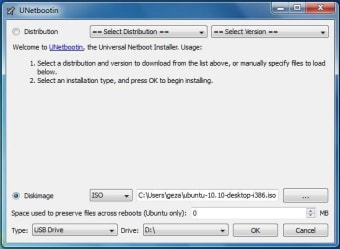
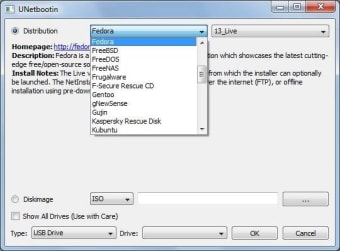
UNetbootin is a Linux installation application that can be used to install Ubuntu and other Linux distributions via a USB drive. It allows users to select from a list of known compatible distributions or use their own disk image.
UNetbootin works by installing a bootable Linux image to a USB device, such as a thumb drive or external hard drive. Doing this allows a computer to boot into (and install) Linux with minimal fuss. UNetBootin also allows for installation on hard drives.
Old but reliable
Compared to alternatives, such as Rufus, UNetbootin is older and more time-tested. Its strong points and flaws are well-known. Its user interface is austere but functional, with limited built-in help. However, it's easy to find help with UNetbootin online.
UNetbootin does an excellent job of installing Linux distros from its built-in list and runs on multiple platforms, including Windows, Mac, and Linux itself. In particular, when installing Ubuntu with UNetbootin, you can create a persistent install, allowing you to save files or install new apps to the USB drive.
Best use cases
UNetbootin's hard drive install mode requires the operating system you select to co-exist with Windows — or whatever operating system you currently use. An invalid disk image or failed install can make Windows unusable. Thus, it is best to use UNetbootin's USB install mode.
Great for Linux first-timers and techs
Thanks to the persistent install option, UNetbootin is one of the best ways to try Linux without committing to it. Install Ubuntu to a USB flash drive, so you can take a working installation of Ubuntu wherever you go. It is also handy for troubleshooting and fixing malfunctioning computers.
Fit for purpose
UNetbootin's secondary functions, such as custom disk images and hard drive installation, are not its strong points. Still, if you want to try out a common Linux distribution, it's perfect for that.














.png)